Getting started with Open Source Software
Being up-to-date and avoiding conflicts

If you want to collaborate with open-source projects but you don't know how to start, it couldn't be easier. Pick a project, pick an issue, and follow a handful of git commands.
Find a project and a first issue
The best first project is one you already use: you know what it does, and you have probably hit one of its rough edges.
Many maintainers label beginner-friendly tasks as good first issue. You can list them from the terminal with the
GitHub CLI:
# In one repository
gh issue list --repo owner/repo --label "good first issue"
# Open and unassigned, across PHP projects
gh search issues --label "good first issue" --language php --state open --no-assignee
Don't underestimate the docs. Fixing a typo or an outdated example in the README is a real contribution, and it
teaches you how the project works (CI, reviews, merges) with very little risk.
Before writing any code
Read the CONTRIBUTING.md file. It tells you how to run the tests, which coding standard to follow and which
branch to target. Read the code of conduct too.
For anything bigger than a small fix, ask in the issue first. A short comment with your plan is enough.
Agreeing on the approach takes a couple of comments. Discovering after 500 lines that the maintainers had already ruled it out takes a lot longer, for both sides.
Keep your pull request small and focused: one topic per branch. A PR that fixes a bug, renames three classes and bumps a dependency is hard to review. Split it into three branches.
From fork to pull request
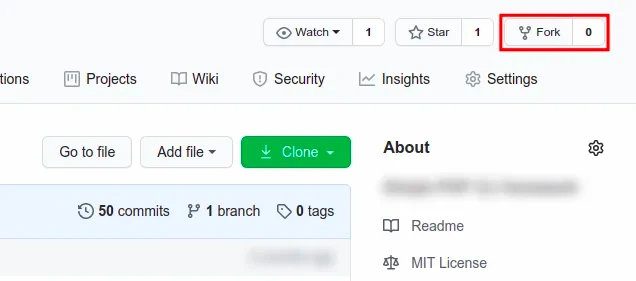
1. Fork the repository into your account
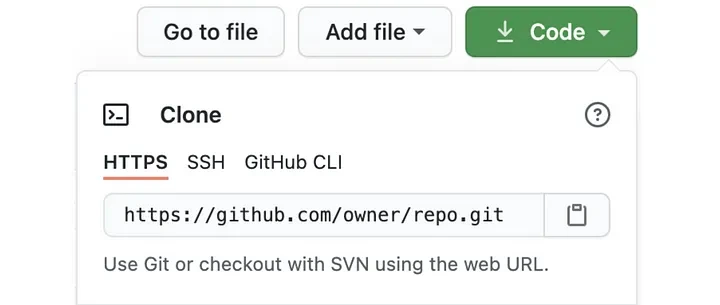
2. Clone the forked project on your computer
git clone [email protected]:myself/forked.git3. Add the upstream to sync with the new changes to your project
(master)$ git remote add upstream https://github.com/owner/repo.git
# If you run `git remote -v` you should see:
origin	[email protected]:myself/forked.git (fetch)
origin	[email protected]:myself/forked.git (push)
upstream	https://github.com/owner/repo.git (fetch)
upstream	https://github.com/owner/repo.git (push)
4. Create a new branch
(master)$ git checkout -b new-branch5. Commit, push and open the pull request
Once you're done, let's create a PR! Check git status first, so your IDE folders (.idea/, .vscode/) don't end up
in someone else's project. A global gitignore keeps them out of every
repository.
(new-branch)$ git status # Check what you are about to commit
(new-branch)$ git add . # Add to git your changes
(new-branch)$ git commit -m 'Type the commit message'
(new-branch)$ git push origin new-branch # Push in forked & origin
Open your fork on GitHub and click Compare & pull request. Explain what you changed and why, and add Closes #123
to the description so the issue closes when the PR is merged.
If you cloned with HTTPS and get errors trying to push your last changes, switch origin to SSH (you need an SSH key
in your GitHub account):
(master)$ git remote set-url origin [email protected]:myself/forked.gitShortcut: the GitHub CLI
With the GitHub CLI, steps 1 to 3 are a single command. It forks the repository, clones your fork as origin and adds
the original one as upstream:
gh repo fork owner/repo --cloneAfter committing, gh pr create opens the pull request from the terminal. --fill takes the title and body from
your commits:
(new-branch)$ gh pr create --fillKeep your fork in sync
Other pull requests get merged while you work on yours. Get the last changes in your project before you start a new branch (not necessary if you just forked the project):
(master)$ git fetch upstream master
(master)$ git merge upstream/master
(master)$ git push origin master # Update your fork on GitHub too
If the upstream moved while your branch was open, rebase your branch on top of it. Rebasing rewrites your commits, so
the push needs --force-with-lease. Unlike --force, it refuses to overwrite commits on the remote branch that you
haven't fetched yet.
(new-branch)$ git fetch upstream
(new-branch)$ git rebase upstream/master
(new-branch)$ git push --force-with-lease origin new-branch
To move only some of your commits, take a look at Git Rebase onto.
Many repositories now use
maininstead ofmasteras the default branch. Rungit remote show upstream, look forHEAD branch, and replacemasterin these commands.
Handle the review
Maintainers will often ask for changes. Don't open a new PR. Commit the fixes on the same branch and push them, and the pull request updates by itself.
(new-branch)$ git add .
(new-branch)$ git commit -m 'Address review comments'
(new-branch)$ git push origin new-branch
Reply to each comment so the reviewer knows what changed.
That's all!
Every merged pull request, yours or someone else's, moves the original repository forward. Sync your fork before you start your next branch.

Summary
# Synchronize your local repository to the original one
# Need to run only once the first time
git remote add upstream https://github.com/owner/repo.git
# Get all changes from sync project into upstream branch
git fetch upstream master
# Merge upstream branch into your current branch
git merge upstream/master
Happy contributing! 🚀